
Recruitment analytics for research sites
See how each study's recruitment is progressing, from enquiry to booked visit, using the activity already recorded in Clinrol Connect.
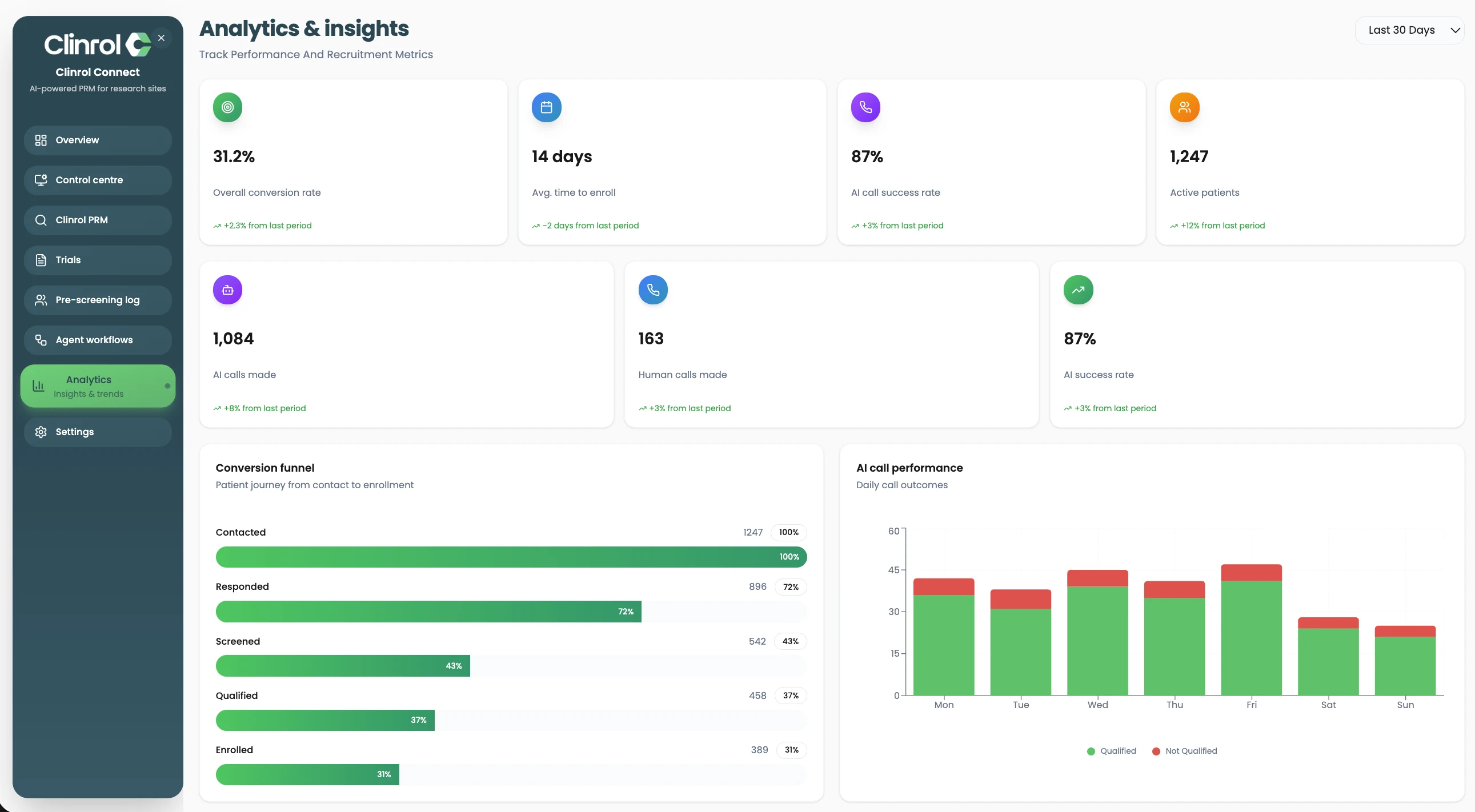
What recruitment analytics show
When calls, screening and bookings live in different tools, answering a simple question such as where patients are dropping out takes a spreadsheet and an afternoon.
Because Clinrol Connect records these steps on the patient record, analytics can show funnel performance, conversion between stages, drop-offs and staff workload across studies.
Worked example: a weekly study review
Illustrative scenario with synthetic details. A fictional site manager prepares for a weekly recruitment meeting for two fictional studies.
- Step 1
Open the funnel
The manager views each study's recruitment funnel by stage.
- Step 2
Spot the gap
One study shows many enquiries reaching screening but few progressing to a booked visit.
- Step 3
Check workload
Staff workload shows one coordinator holding most of that study's follow-ups.
- Step 4
Adjust
The team rebalances follow-ups and reviews the visit reminder workflow.
- Step 5
Review next week
The same view is used at the next meeting to see whether the stage has moved.
What recruitment analytics includes
Funnel performance
See patients by recruitment stage for each study.
Conversion
Compare how patients move between stages.
Drop-offs
Identify where patients stop progressing.
Staff workload
Understand how follow-up work is spread across the team.
Frequently asked questions
- Where does the analytics data come from?
- From the enquiries, calls, screening, messages and appointments recorded in Clinrol Connect.
- Can we compare studies?
- Yes. Analytics show recruitment across studies so you can see which need attention.
- Does analytics show coordinator workload?
- Yes. Staff workload is one of the views, helping managers spread follow-up work.
- Can we export reports?
- Ask during a demo about the exports and reporting your team needs.
Works alongside
AI pre-screening
Ayla, the AI agent in Clinrol Connect, calls patients, asks protocol-specific questions and records structured answers for staff review.
Read about ai pre-screeningScheduling
Book qualified patients into staff calendars from the patient record, with automated reminders before each visit.
Read about schedulingStaff calling
Make and receive patient calls inside Clinrol Connect, with recordings, transcripts and call history on the patient record.
Read about staff callingSee recruitment analytics with your own study in mind
Book a walkthrough of Clinrol Connect and bring your screening questions and recruitment workflow.